Real Guitar - Music Band Game
- 3.1
- Rating
- 100.00M
- Installs
- Free
- Price
 Analysis by App-foxy
I approached Real Guitar - Music Band Game as a quick way to keep guitar practice and musical curiosity close at hand, rather than as a replacement for a physical instrument. It is a free music game from Gismart, built around electric and acoustic guitar sounds, chords, and tabs. That combination makes it appealing when I want to experiment without carrying a guitar, but it also creates an important expectation: this is best judged as an accessible touchscreen instrument and game, not as a complete course for becoming a guitarist.
The app has been around since May 17, 2013, and its reach is substantial, with more than 100 million installs. That tells me it has remained easy to discover for a long time, although popularity alone does not guarantee a smooth experience for every player. Its average rating sits at 3.0 from roughly 683,000 ratings and 14,000 reviews, which is a useful warning to balance the impressive audience size with realistic expectations. I would try it for casual playing, chord exploration, and short sessions, while keeping a physical guitar or a more structured learning tool nearby if serious progress is the goal.
What playing it feels like on a phone
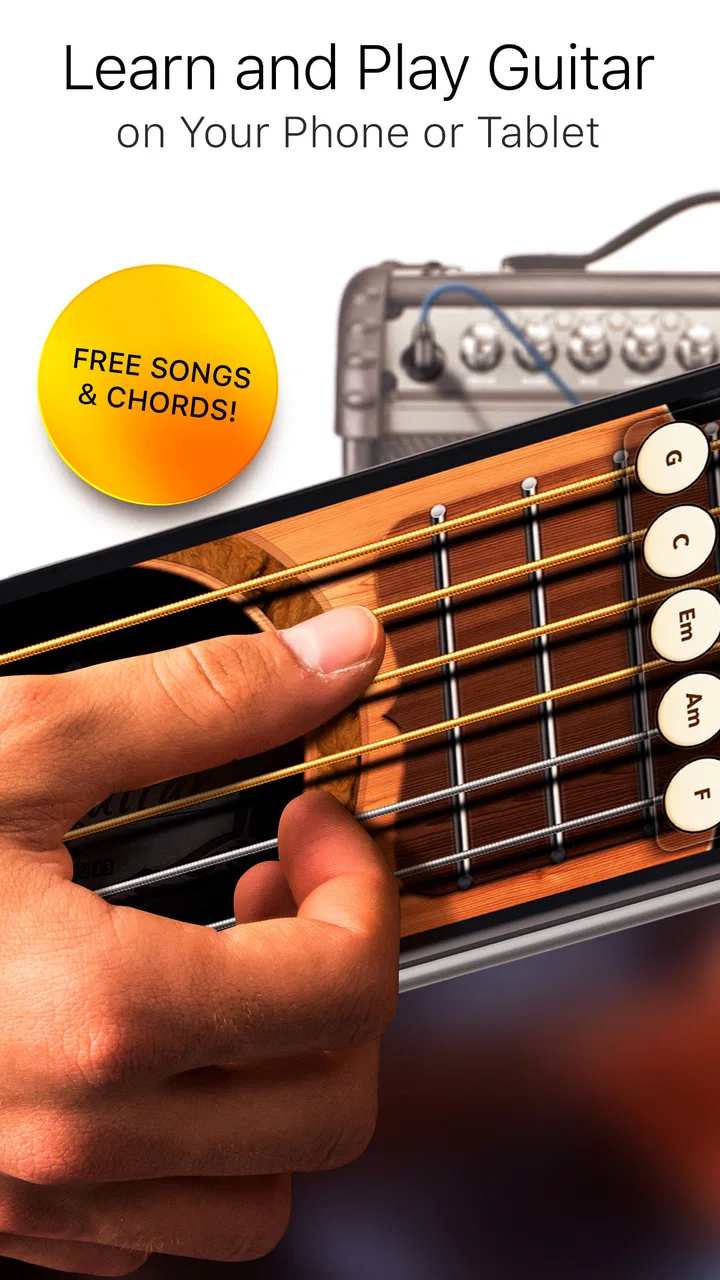
The central appeal is immediate access. Instead of tuning strings, finding a comfortable chair, and remembering where a chord shape sits on a real fretboard, I can open the game and start tapping. The electric and acoustic sound choices give the experience a little variety, while the chord and tab focus makes it more musical than a simple button-mashing game. For a beginner, that lower barrier matters: I can test whether I enjoy guitar-style playing before spending money on an instrument.
You May Also Like

 Pandora - Music & Podcasts
Pandora’s Music Is Easy to Start, but Harder to Recover
Pandora’s strength is its low-effort path from a seed to a station. Its weak spot is how much confidence it asks you to place in connection, setup, and quiet recovery.

 8 Ball Pool
 Is Built on Rivalries, Rematches, and Routine
A close look at the rivalries, rematches, shared routines, and unanswered safety questions that turn a quick pool match into a persistent mobile community.

 Samsung Music
’s Quiet Strength Is Playing What You Already Own
Its reach comes less from spectacle than from dependable access to a personal library. That simplicity is both the app’s strongest retention engine and its ceiling.

 AccuWeather: Weather Radar
AccuWeather Review: A Quick, Clear Forecast for Everyday Decisions
For everyday plans, the best forecast is the one you can understand quickly. AccuWeather makes rain timing, radar, and local conditions easy to act on, with a few trade-offs.

 Hill Climb Racing
Why Hill Climb Racing Still Turns Crashes Into One More Run
A tiny car, a bumpy hill and one more upgrade: Hill Climb Racing keeps resurfacing because its simple chaos makes every near-miss feel personal.

 AliExpress - Shopping App
AliExpress Makes Global Shopping Feel Personal, but Shoppers Bear the Risk
AliExpress turns a global marketplace into a pocket-sized discovery engine. Its reach is useful, its shopping loop compelling, and its trade-offs easy to miss.
More From Our News Desk
View All News


The touchscreen changes the nature of the activity, though. A phone or tablet does not respond like strings under the fingers, and tapping a displayed control cannot fully reproduce the pressure, timing, and hand coordination of a real guitar. I found the app more convincing as a way to understand the order of chords and the rhythm of a simple passage than as a way to develop accurate fretting technique. That distinction is easy to overlook when the interface looks like a guitar.
I would recommend using headphones when possible, especially if the phone is being used in a shared room. The main benefit is not just louder sound; it is hearing the difference between a clean tap and a rushed sequence. A quiet setting also makes it easier to notice whether I am following the tab or merely repeating a familiar pattern. This is a small habit, but it turns a few idle minutes into more deliberate practice.
A practical everyday use case is a commute or a lunch break. If I have ten minutes and no instrument with me, I can use the app to review a chord sequence or play along with a pattern I am trying to remember. It is also useful for someone who wants to explore guitar sounds before choosing between acoustic and electric equipment. I would not use it in a situation where accurate physical technique is the main objective, but it works well as a portable musical sketchpad.
Learning value for beginners
The chord-and-tab approach gives newcomers a visual starting point. Rather than asking me to understand music notation first, it presents information in a form that feels closer to how guitar parts are commonly discussed. That can make the first few sessions less intimidating. I can concentrate on recognizing a sequence, keeping a steady pace, and becoming comfortable with the idea that songs are built from repeating musical parts.
My advice is to choose one small passage and repeat it slowly instead of jumping constantly between sounds. The app is easy to treat like an arcade game, especially when quick taps produce an immediate response. Slowing down helps reveal whether I actually remember the pattern. I would also say the chord display should be treated as a guide, not proof that I could play the same passage on a physical guitar. The two skills overlap, but they are not identical.
Another useful workflow is to use the app before touching a real instrument. I can first listen to the progression, identify where the changes happen, and then try those changes on a guitar if one is available. This reduces the mental load of learning the sequence and handling the instrument at the same time. In that role, Real Guitar is more useful than a random collection of music mini-games because it keeps my attention on recognizable guitar concepts.
There is a limit to how far that method can take me. A learner who needs detailed feedback about finger placement, posture, picking direction, or unwanted string noise will eventually need something else. The app can help with musical familiarity, but it cannot replace an instructor’s eyes or the physical resistance of strings. For that reason, I see it as a first step, a practice companion, or a way to maintain interest between proper lessons.
Spending, access, and the pressure to continue
The game is free to download, which makes the initial decision straightforward. I can install it and decide whether the controls and sound fit me without paying upfront. There are in-app purchases ranging from $1.99 to $89.99 per item, so spending can become a meaningful consideration for anyone who prefers to keep every feature available without repeated purchase decisions. The wide range is worth noticing before handing the phone to a child or allowing purchases on a shared device.
I would approach the purchase screen deliberately rather than tapping through it during a quick session. The most sensible test is to spend time with the free experience first: check whether the controls feel comfortable on the device, whether the sound is satisfying, and whether the chord or tab presentation actually helps. If those basics do not work for me, buying additional content will not solve the underlying mismatch between a touchscreen and a real guitar.
Because the app is labeled for Everyone, it may attract younger players as well as adults. That broad age rating makes it approachable, but it does not remove the need for household purchase controls. I would explain to a child that “free” refers to getting started, not necessarily to every optional item inside the game. Clear boundaries are especially important when a game presents music as a playful activity and the player is focused on the next sound rather than the cost.
The spending question is also connected to motivation. If purchasing something makes me feel committed, that may be personally useful, but it should not be confused with guaranteed musical progress. Progress comes from returning to a pattern, listening carefully, and connecting what I see on screen with what I want to play. I would only spend when I already know the app fits my routine and the purchase has a clear purpose for me.
Progress without turning practice into pressure
Short sessions are where this game makes the most sense. I can set a modest goal, such as remembering a chord order or keeping a rhythm steady for a few minutes, and stop before the activity becomes repetitive. This approach is better than measuring success by how much content I have touched. A music app can feel busy while teaching very little if I keep switching sounds without giving my ears time to recognize them.
The pressure comes from the temptation to chase immediate feedback. Touchscreen games reward fast responses, while musical improvement often requires repetition that feels slow. I found it helpful to separate exploration from practice: first spend a session trying acoustic and electric sounds, then return later to one sequence and focus on accuracy. That small separation keeps experimentation enjoyable without pretending it is the same as structured training.
For someone already learning guitar, the app can be a memory aid. I might use it to rehearse the order of a progression away from my instrument, then confirm the result on a real guitar later. For someone who has never played, it can answer a more basic question: do chord changes and tab-style instructions feel interesting enough to pursue? In both cases, the value comes from using it with a specific intention rather than expecting the game to create a complete lesson plan automatically.
I would skip it as a primary learning tool if I need a clear curriculum, detailed explanations, or measurable technical correction. A dedicated guitar-learning service, a teacher, or a carefully organized lesson book is a better choice for those needs. Real Guitar is strongest when the goal is low-friction contact with guitar ideas. It is weaker when I need accountability, diagnosis of mistakes, or a direct path from beginner exercises to advanced playing.
Is it fair for players who do not spend?
Fairness works differently here than it does in a competitive multiplayer game. I am not mainly concerned about one player buying an advantage over another; the more relevant question is whether a free user can enjoy the musical core without feeling constantly pushed toward payment. The free entry point is a genuine positive, but the presence of optional items means I would still pay attention to how much of the experience remains comfortable without spending.
For casual use, I can judge fairness by practical value: can I explore the guitar concept, practice a short pattern, and decide whether the app belongs in my routine before purchasing? If yes, the free start is useful. If my interest depends on access to a particular sound or a broader selection, I would want to understand exactly what I am buying before committing. I would not assume that a larger purchase automatically means better learning.
The app’s audience size also creates two different expectations. A newcomer may see more than 100 million installs and assume the game will feel polished for every device and playing style. An experienced guitarist may see the same figure and expect a serious instrument simulator. Neither assumption is safe. The install count shows reach, while the 3.0 average suggests that reach includes plenty of people with mixed experiences. I would use the app myself for a while before deciding whether it deserves paid use.
There is no reason to compare this directly with a competitive rhythm game where rankings and paid advantages dominate the discussion. The more useful comparison is with a physical guitar, a tuner, lesson content, and other virtual instruments. A real guitar offers authentic technique and sound control but costs more, takes space, and has a steeper first-day barrier. A structured lesson app may teach more clearly but can feel less playful. Real Guitar sits between those choices: more approachable than hardware and more hands-on than passive music content, but less complete than either a real instrument or a full course.
Details I would check before settling in
The current version is 3.41, and the minimum operating-system requirement is iOS 9 or later. That makes the compatibility question relatively easy for many iPhone and iPad owners, but I would still check the device before planning to use it on an older phone. Screen size matters too. A larger display should make chord shapes and tab-style information easier to read and tap, while a small phone can make rapid interaction feel cramped.
I would also decide whether the app is for sound exploration or for learning. Those are related but different uses. If I mainly want to hear electric and acoustic guitar tones and play casually, the app’s immediate interface is the attraction. If I want to build finger strength, learn picking accuracy, or perform a song on a physical instrument, I should pair it with hardware practice. Being honest about that goal prevents disappointment.
One trade-off that is easy to miss is portability versus expressive control. The phone wins whenever convenience matters: it is ready during a break, quiet enough for shared spaces, and less demanding than carrying a guitar. The physical instrument wins when I want dynamics, sustained notes, bends, vibrato, and the tactile feedback that tells me exactly what my hands are doing. Real Guitar cannot remove that trade-off; it simply makes the portable side more inviting.
I would also avoid judging my musical ability by how quickly I can operate the screen. Fast tapping may show that I understand the interface, not that I can keep a convincing rhythm or change chords cleanly on strings. A useful self-test is to close the app after practicing a sequence and try to describe the order from memory. If I cannot, I was probably following visual prompts rather than learning the progression.
Who should download it, and who should pass?
I think it is a good fit for curious beginners, casual players, travelers, and guitar learners who want a lightweight way to review ideas away from their instrument. It also suits someone who is deciding whether guitar is interesting enough to explore further. The free starting point lowers the risk, and the electric and acoustic options give the first sessions more personality than a dry chord reference.
I would recommend passing if the main requirement is a realistic guitar simulator, professional recording control, or a complete teaching path. I would also pass if in-app purchases are likely to create tension in the household and there is no plan to control them. The broad Everyone rating makes the app approachable, but responsible spending still depends on the person using the device and the settings around it.
For intermediate and advanced guitarists, the value is more limited but not nonexistent. I can use it to think through a chord progression, keep a musical idea in mind, or occupy a few minutes without setting up equipment. It is unlikely to replace a serious practice routine. A guitarist who already knows exactly what to work on will probably gain more from the real instrument, a metronome, or targeted lesson material.
My final view on value and trust
After weighing the convenience against the limitations, I see Real Guitar as a friendly entry point rather than a definitive guitar solution. Gismart has made a music game that is easy to approach, and the focus on acoustic and electric sounds, chords, and tabs gives it a clearer purpose than a generic tapping toy. I like it most when I use it for short, intentional sessions: previewing a progression, testing my interest in guitar, or keeping a musical idea active while I am away from home.
My trust in the app is conditional in a practical way. I trust the free download as a low-commitment experiment, but I would not treat the install count as proof that it will suit me, and I would not make a purchase before testing the basic interaction. The 3.0 average rating encourages a careful trial rather than blind enthusiasm. I would also remember that the available purchase range, from $1.99 to $89.99 per item, makes purchase controls and deliberate decisions important.
The best way to use it is to define the job before opening it. For a five-minute chord review, it can be handy. For discovering whether I enjoy guitar concepts, it can be encouraging. For learning physical technique or following a complete progression from beginner to confident performer, I would choose a real guitar, an instructor, or a more structured learning option. Its real strength is convenient musical exploration, not a promise to replace practice.
Overall, I would suggest trying Real Guitar - Music Band Game if you want a free, approachable music game and understand the difference between tapping a virtual instrument and playing a real one. I would keep spending optional, use the app with a clear routine, and judge it by whether it helps me return to music more often. With those expectations, it is a worthwhile experiment; with expectations of a complete guitar course or professional instrument, it is probably the wrong choice.
FAQs for Real Guitar - Music Band Game
01What features does Real Guitar - Music Band Game offer?
Real Guitar - Music Band Game provides a realistic guitar playing experience with a variety of modes, including solo and band play. It offers multiple guitar types, high-quality sound, and a user-friendly interface. Players can learn chords and songs, and even record their performances. The app also includes tutorials for beginners.
02Is Real Guitar - Music Band Game suitable for beginners?
Yes, Real Guitar - Music Band Game is perfect for beginners. It includes step-by-step tutorials and practice modes that help new players learn the basics of guitar playing. The app offers a range of difficulty levels, allowing users to start simple and gradually progress as they improve their skills.
03Does Real Guitar - Music Band Game require an internet connection?
Real Guitar - Music Band Game can be used offline, allowing you to practice and play without an internet connection. However, some features, like downloading additional songs or accessing online tutorials, may require an internet connection to function properly.
04Are there in-app purchases in Real Guitar - Music Band Game?
Yes, Real Guitar - Music Band Game includes in-app purchases. While the app offers numerous free features, certain premium content like exclusive songs, advanced tutorials, and additional guitar styles may require purchase. These purchases enhance the app experience but are not essential for enjoying the basic features.
05What devices are compatible with Real Guitar - Music Band Game?
Real Guitar - Music Band Game is available for both Android and iOS devices. It supports a wide range of smartphones and tablets, ensuring smooth performance on most modern devices. It's advisable to check the app store for specific device compatibility and minimum operating system requirements before downloading.
Pros
- Intuitive interface for beginners.
- Wide variety of guitar sounds.
- Realistic strumming experience.
- Customizable chord library.
- Offline mode available.
Cons
- Ads can be intrusive.
- Limited free features.
- Occasional app crashes.
- Requires in-app purchases.
- No multi-instrument support.

Real Guitar - Music Band Game
Gallery